Fundamentals · Computer Fundamentals
What is a computer?
By Himanshu Singour
Every hack you will ever study comes down to one simple thing. A computer did exactly what it was told to do and somebody found a way to tell it something it was never meant to hear. So before you learn to break systems or defend them you need a clear picture of what a computer really is. Once you see how the pieces fit together you will spot weak points that other people walk past every day.
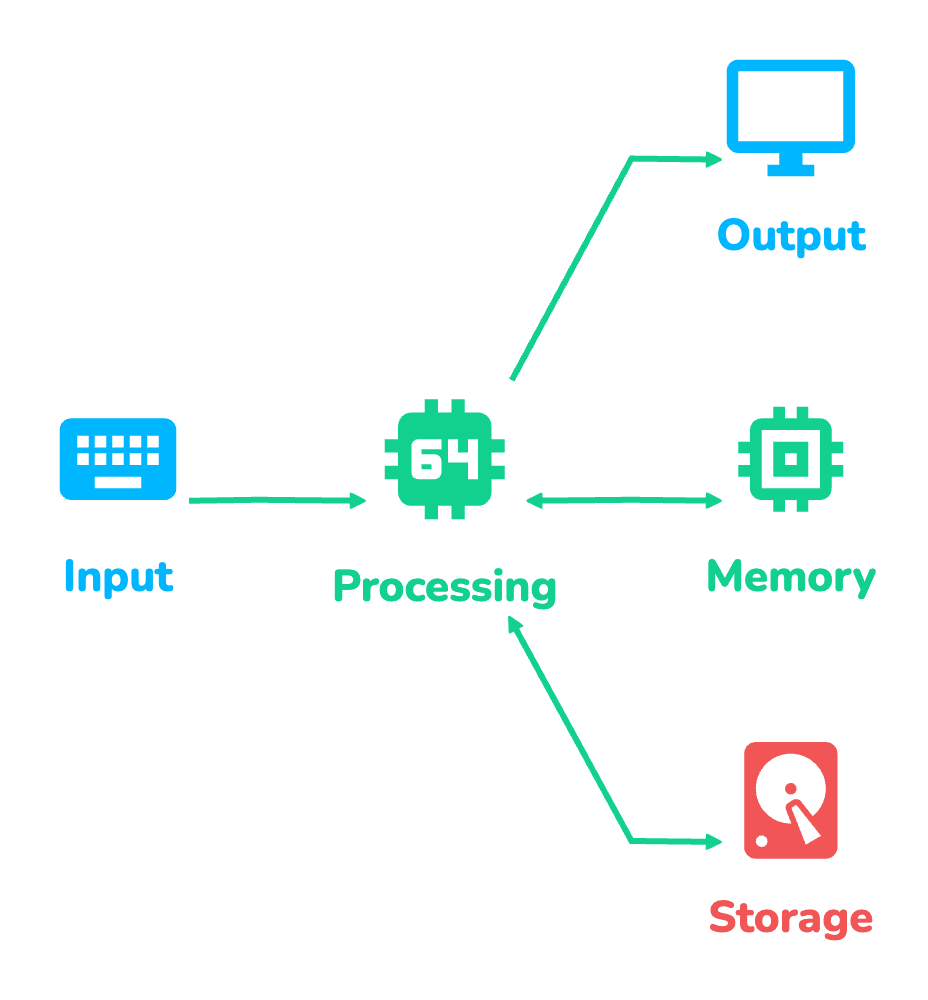
This lesson explains what a computer is in plain words. You will meet the four jobs that every computer does and the parts that do them. You will see how a processor runs a program one tiny step at a time. A real story from a pharmacy in Vidisha shows why a device that nobody called a computer still needed protecting. At the end you will run a small program that behaves like a computer and watch an attacker take control of it.
1. Understanding the Words
These words appear in every course on HackXlr8. Take a minute to get comfortable with them now.
| Word | What It Means | Example |
|---|---|---|
| Computer | A machine that takes input and processes it by following instructions and then stores data and gives output | A laptop or a phone or a web server |
| Data | Any information the computer works with | Your name or a photo or a number |
| Program | A list of instructions that tells the computer what to do step by step | A web browser or a calculator app |
| Instruction | One tiny command inside a program | Add these two numbers |
| Hardware | The physical parts you can touch | The keyboard and the screen and the chips inside |
| Software | The programs that run on the hardware | WhatsApp and Chrome and Windows |
| CPU | The processor that carries out instructions | An Intel or AMD or Apple chip |
| Memory (RAM) | Fast workspace that is wiped when the power goes off | The space your open apps live in |
| Storage | Slower space that keeps files even after shutdown | An SSD or a hard disk or a memory card |
| Operating system | The main program that manages the hardware for every other program | Windows or Linux or Android |
2. The Four Jobs Every Computer Does
A computer can be as big as a room full of servers or as small as a smartwatch. Every one of them does the same four jobs.
- Input. Data comes in from the outside world. It may come from a keyboard or a mouse or a camera. On servers most input arrives over the network as requests from other computers.
- Processing. The CPU works on that data by following the instructions of a program. Checking whether a typed password is correct is processing.
- Storage. Data is kept so it can be used later. Short term data sits in memory while a program runs. Long term data lives on a disk as files.
- Output. Results leave the computer. A page appears on your screen or a sound plays or a reply travels back across the internet.
Here is how the four jobs look in everyday use and where trouble can start.
| Job | Everyday Example | What Can Go Wrong |
|---|---|---|
| Input | Typing your password on a login page | An attacker types something the program does not expect such as code instead of a name |
| Processing | The server checks the password against its records | A bug in the program makes it skip the check |
| Storage | The server keeps your account details in a database | Passwords saved in plain text get stolen in a data breach |
| Output | The site shows Welcome back on your screen | An error message prints private details for everyone to read |
3. What Is Inside the Box
Open up a laptop or a desktop and you will find the same team of parts. You will study each one closely in the next few lessons. For now just learn who does what.
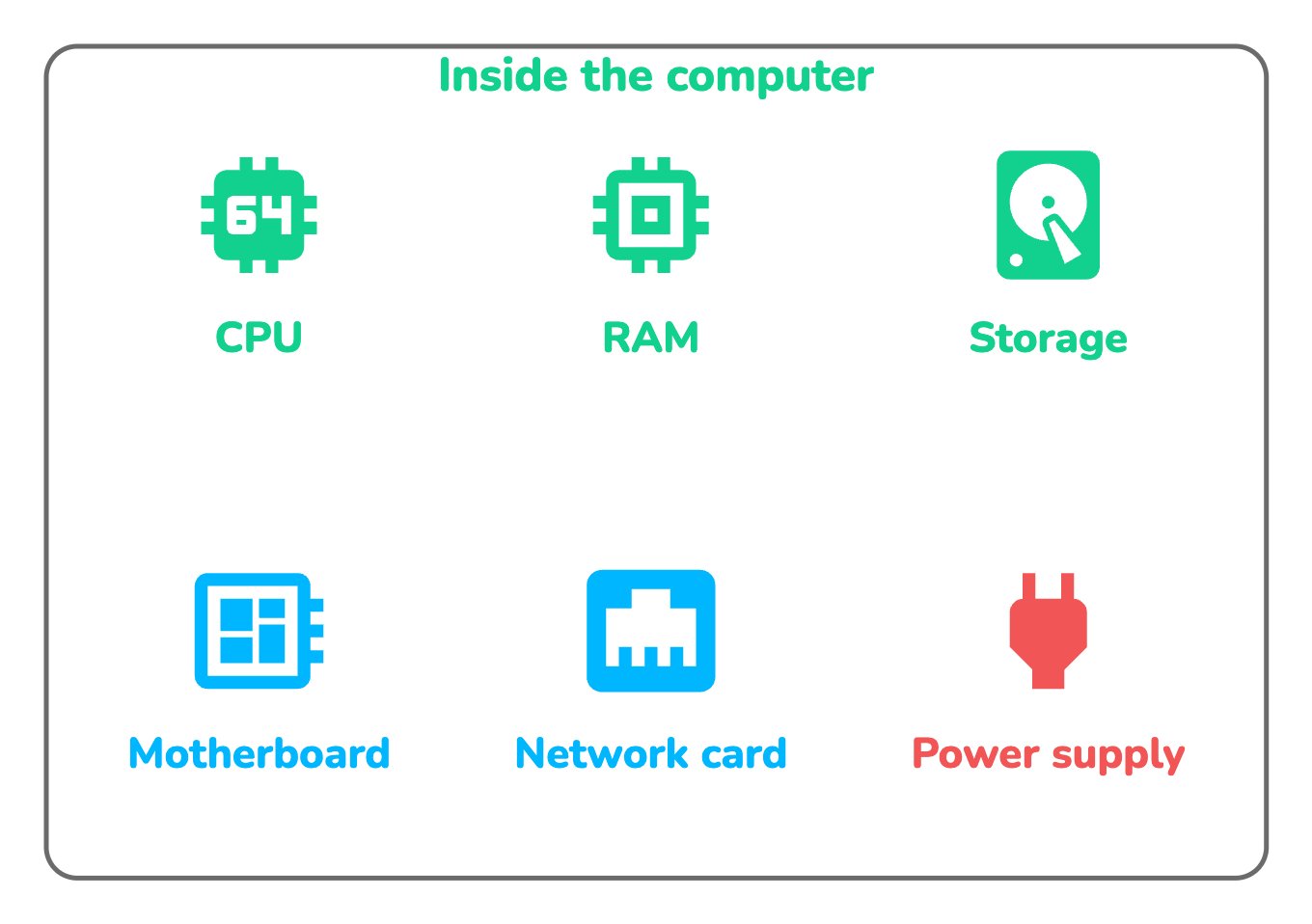
| Part | Its Job | What Happens Without It |
|---|---|---|
| CPU | Carries out every instruction of every program | Nothing runs at all |
| RAM | Holds the programs and data in use right now | Programs have nowhere to work |
| Storage | Keeps the operating system and apps and files | Everything is lost at shutdown |
| Motherboard | Carries signals between all the other parts | The parts cannot talk to each other |
| Network card | Sends and receives data over WiFi or a cable | The computer cannot reach the internet |
| Power supply | Turns wall power into what the parts need | The computer will not switch on |
All these physical parts are hardware. The programs that tell them what to do are software. The most important software is the operating system because it sits between the hardware and every other program. When an app wants to save a file it asks the operating system and the operating system talks to the disk. You will learn this in detail in the lessons on hardware and software and on operating systems.
You can look at the hardware of your own machine right now. These commands only read information and change nothing. On Linux open a terminal and run them one by one.
uname -a
lscpu
free -h
lsblk
The first line names the operating system and its version. The second describes the CPU. The third shows how much RAM is used and free and the last lists your disks. On Windows open Command Prompt and type systeminfo to see similar details in one long list. Attackers run these exact commands after they break into a machine because the first thing they want to know is what kind of computer they landed on.
4. How a Computer Runs a Program
A program looks like an app with buttons and screens. Underneath it is a very long list of very small instructions.
An instruction is something tiny such as load this number or add these two values or jump to another instruction. Programs and data are both stored in memory as numbers. The CPU keeps a pointer called the program counter that remembers which instruction comes next. Then it repeats a simple loop again and again.
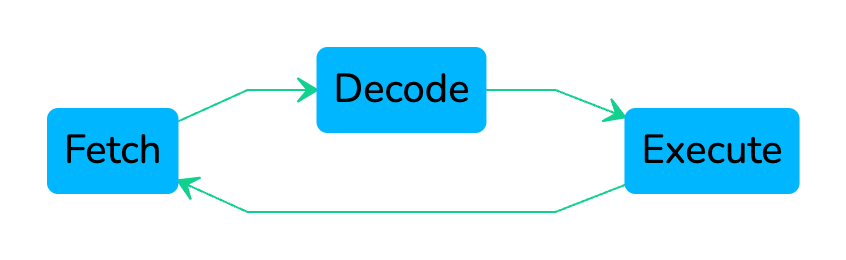
- Fetch. The CPU reads the instruction stored at the address in the program counter.
- Decode. It works out what the instruction asks for and which data it needs.
- Execute. It does the work and stores the result. Then the program counter moves on to the next instruction.
A modern CPU runs this loop billions of times every second. That is what the GHz number on a laptop box describes. A 3 GHz processor ticks three billion times per second.
Now comes the part every hacker cares about. The CPU has no idea who wrote an instruction. It does not check whether an instruction came from the original program or from an attacker. If an attacker can place their own instructions in memory and get the program counter to point at them then the CPU runs them as if they belonged there. A whole family of classic exploits works on this single idea. You will build a tiny version of it in section 8.
5. Computers Are Everywhere
When people hear the word computer they picture a laptop. As a security learner you need a much wider picture because attackers certainly have one.
| Type | Examples | Why It Matters in Security |
|---|---|---|
| Personal computers | Laptops and desktops | The usual way into a company is through one person opening one bad email |
| Servers | Machines that run websites and apps and databases | They hold the most valuable data and are the main target in bug bounty programs |
| Mobile devices | Phones and tablets | They carry messages and photos and banking apps in one pocket |
| Network devices | Home routers and office switches and firewalls | Every byte of traffic passes through them so a hacked router can watch it all |
| Embedded and smart devices | CCTV recorders and smart TVs and card machines | They often run old software that nobody ever updates |
| Virtual machines | A full computer running as software inside another computer | Most cloud services and your future hacking lab are built from them |
A virtual machine deserves one more line. It behaves exactly like a real computer with its own CPU and memory and disk but all of it is borrowed from the machine underneath. Later in this track you will build a safe practice lab out of virtual machines. You can attack them freely because nobody else is harmed.
6. How Hackers and Defenders See a Computer
A beginner sees a computer as one box. An attacker sees four doors and only needs one of them to be open.
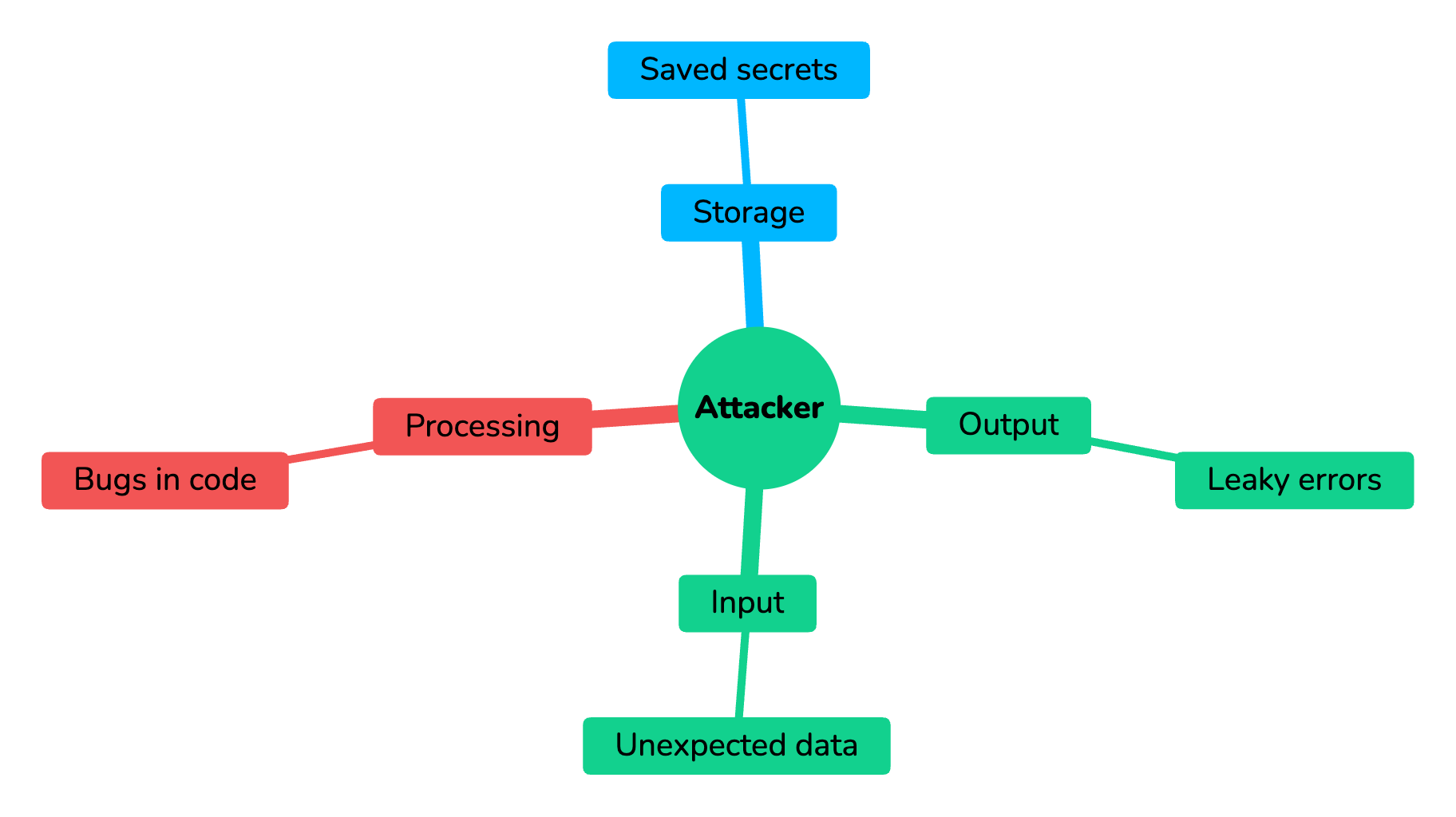
| Door | The Attacker Asks | The Defender Answers |
|---|---|---|
| Input | Can I send something the program never expected? | Check every piece of input before using it |
| Processing | Is there a bug that makes the program misbehave? | Keep software updated so known bugs are fixed |
| Storage | Is sensitive data saved where I can read it? | Lock data with permissions and encryption |
| Output | Does the system show more than it should? | Show users only what they need and hide error details |
Notice that both sides ask the same four questions. Attackers use them to find a way in and defenders use them to close the doors first. Keep this table in mind because almost every lesson in this track fits into one of its rows.
7. A Real Story: The Recorder Nobody Called a Computer
Vidisha is a quiet town in Madhya Pradesh about an hour from Bhopal. Mridula Bhargava runs a busy pharmacy near the bus stand there with four counters and eight CCTV cameras.
Two years ago an installer set up the cameras and a recorder box in the back room. He connected the recorder to the shop WiFi so Mridula could watch the cameras on her phone. He left the factory username and password unchanged and nobody gave the box another thought. To everyone in the shop it was just a camera box and not a computer.
One morning a regular customer told Mridula that a clip from her pharmacy was being shared in a local social media group. It showed her counter and her staff from the exact angle of her own cameras. Mridula called Joshna Raikwar who manages computers for several shops in Vidisha.

Mridula now has a simple rule for her shop. If a device has a plug and a network connection it gets treated like a computer. Its password gets changed on day one and its updates get checked every month.
8. Try It Yourself: Build a Tiny Computer
The best way to understand a computer is to build a small one. The program below copies the fetch, decode and execute loop in a few lines of JavaScript. Its memory has six slots. Slots 0 and 1 hold the user input and slots 2 to 4 hold the program. Slot 5 holds a secret that the program never prints.
The code needs Node.js 18 or newer. No packages are needed.
const SECRET = "Locker code is 4831";

function makeMemory() {
  return [
    0,
    0,
    ["ADD", 0, 1],
    ["PRINT"],
    ["HALT"],
    SECRET,
  ];
}

function readInput(memory, values) {
  for (let i = 0; i < values.length; i++) {
    memory[i] = values[i];
  }
}

function run(label, values) {
  console.log(`=== ${label} ===`);
  const memory = makeMemory();
  readInput(memory, values);
  let pc = 2;
  let acc = 0;
  let step = 1;
  while (true) {
    const instruction = memory[pc];
    const [op, a, b] = instruction;
    console.log(`step ${step}: fetch address ${pc} -> ${op}`);
    if (op === "ADD") {
      acc = memory[a] + memory[b];
    } else if (op === "PRINT") {
      console.log(`  output: ${acc}`);
    } else if (op === "LEAK") {
      console.log(`  output: ${memory[a]}`);
    } else if (op === "HALT") {
      console.log("  computer stops");
      break;
    }
    pc++;
    step++;
  }
  console.log("");
}

run("Normal user types 7 and 5", [7, 5]);
run("Attacker types 7 and 5 and one extra value", [7, 5, ["LEAK", 5]]);
Save the file as tiny-computer.mjs and run node tiny-computer.mjs in a terminal.
=== Normal user types 7 and 5 ===
step 1: fetch address 2 -> ADD
step 2: fetch address 3 -> PRINT
  output: 12
step 3: fetch address 4 -> HALT
  computer stops

=== Attacker types 7 and 5 and one extra value ===
step 1: fetch address 2 -> LEAK
  output: Locker code is 4831
step 2: fetch address 3 -> PRINT
  output: 0
step 3: fetch address 4 -> HALT
computer stops- makeMemory builds the six memory slots. Numbers and instructions and the secret all live in the same memory just like in a real computer.
- readInput copies whatever the user types into memory starting at slot 0. This is the input job and it contains the bug. It never checks how many values arrived.
- run is the CPU. The variable
pcis the program counter and starts at slot 2. Each pass of the loop fetches the instruction at that slot and decodes its name and executes it. - ADD adds slots 0 and 1 and keeps the total in
accwhich acts as a working register. PRINT sends that total to the screen which is the output job.

Look at what happened in the second run. The attacker typed three values instead of two. Because readInput never checked the length the third value spilled into slot 2 and replaced the ADD instruction with LEAK. The CPU fetched slot 2 as usual and ran the attacker's instruction without a second thought. The secret came out as output. This is a tiny model of a real attack called a buffer overflow and you will meet the real thing later in this track.
Try these changes yourself.
- Fix the bug in readInput so it copies at most two values. Run the program again and confirm the attack run now prints 12.
- Change the secret in slot 5 and add a second LEAK input that points at a different slot. Notice that the attacker can now read any slot they like.
- Add a new instruction called SUB that subtracts slot 1 from slot 0. Update the program in makeMemory to use it.
9. Common Mistakes
Beginners often trip over the same few ideas. Clear them up now and the later lessons get much easier.
- Thinking only laptops count. Routers and smart TVs and recorders are computers too. Attackers love them because nobody updates them.
- Mixing up memory and storage. RAM is fast and temporary. Storage is slower and permanent. A laptop with 8 GB of RAM and 512 GB of storage has two very different kinds of space.
- Believing the CPU understands intent. The CPU follows instructions blindly. It never asks whether an instruction is safe or who wrote it.
- Ignoring input from other computers. On a server most input comes from the network. Every request is input that an attacker can shape.
- Leaving factory passwords in place. Default passwords for most devices are listed publicly. Changing them is the cheapest security step there is.
10. Interview Questions
These questions come up in entry level security and IT support interviews.
| Question | Answer |
|---|---|
| What is a computer? | A machine that accepts data and works on it by following a program and then saves results and returns output |
| What are the four jobs of every computer? | Input and processing and storage and output |
| What is the difference between RAM and storage? | RAM is fast temporary memory that is wiped when power goes off. Storage is slower but keeps data permanently |
| What does the CPU do? | It carries out every instruction of every program one small step at a time |
| Is a WiFi router a computer? | Yes. It has a processor and memory and software and it handles input and output over the network |
| Why can attacker code run on a CPU? | The CPU never checks where an instruction came from. If attacker instructions reach memory and the program counter points at them they run |
| What is a virtual machine? | A complete computer that runs as software inside another computer with borrowed CPU and memory and disk |
11. Quick Revision
Read these points once more before you move on.
- A computer receives input and works on it with a program and then keeps data and gives output.
- The CPU does the work while RAM is the short term workspace and storage keeps data for later.
- Every program runs as a loop of fetch then decode then execute billions of times per second.
- The CPU never asks where its instructions came from which is why injected code can run.
- Phones and servers and routers and CCTV recorders and cloud machines are all computers.
- Attackers and defenders both judge a system by its four jobs of input and processing and storage and output.
The next lesson CPU, RAM and ROM opens the box and looks closely at the cook and the counter and the recipe book that never changes.